Daily Verse
Be still, and know that I am God.
Psalm 46:10 · KJV
Classic
Serif on cream. The default that never goes out of style.
Pick from 15+ aesthetic Bible widget themes — Marble, Sunrise, Stained Glass, Night Sky, Gold Leaf — and make the Word part of your phone’s visual life. Free home-screen widgets on iOS and Android.


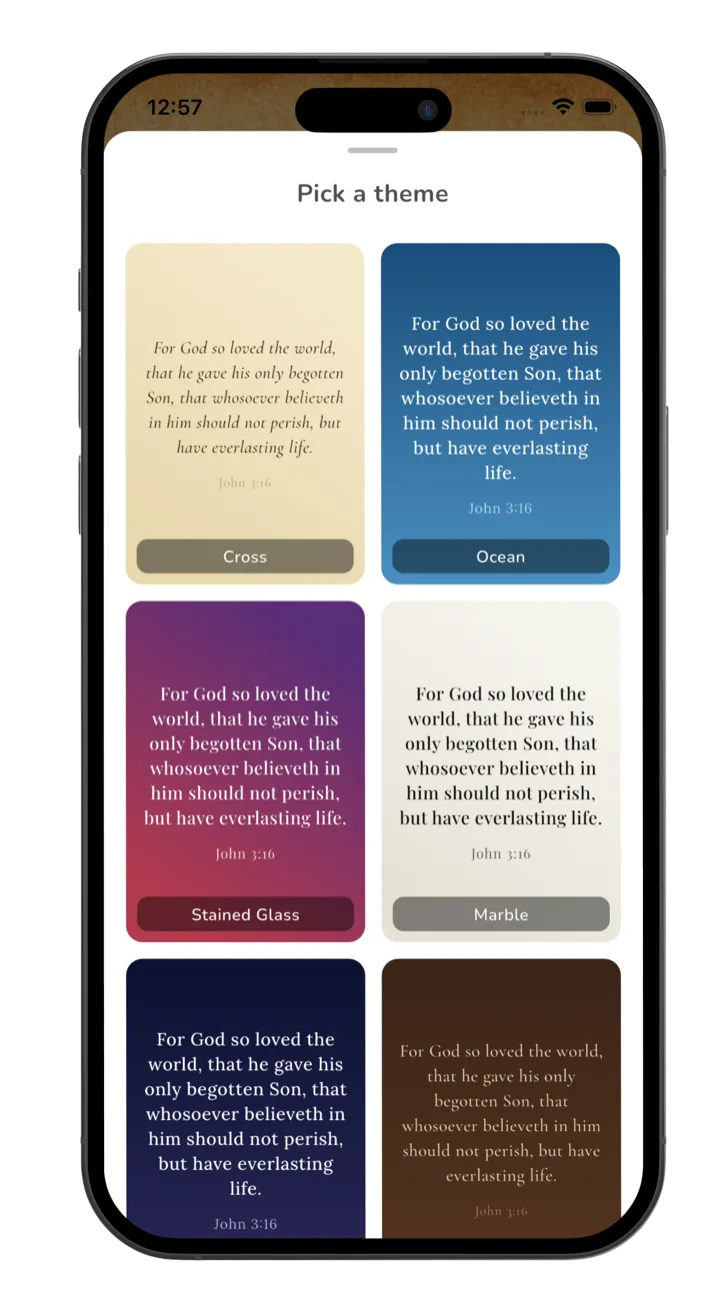
Every theme
Each theme was hand-paired to a verse mood. Tap a theme in the app and the widget refreshes on your home screen in seconds.
Serif on cream. The default that never goes out of style.
Quiet contrast. Easy on eyes at midnight.
No flourish. Just the verse and breathing room.
Warm peach to gold gradient. Best for morning readers.
Slate blue with a deep horizon. Calm without being cold.
Pine green and bark. Grounded, evergreen.
Veined off-white with subtle grain. The Psalms in stone.
Soft pink with metallic warmth. A favorite of journalers.
Midnight navy with faint stars. Psalm 8 in your pocket.
Lavender and dawn-blue washes. Soft Sundays.
Tea-stained paper with deckled edges. Heirloom Bible feel.
Mint and peach. Cheerful without being loud.
Black ground with gold serif. Treasured scripture energy.
Sans-serif on bone. Architectural and clean.
White chalk on slate. Sunday-school nostalgia, grown up.
Cathedral colors with leading. Verses as windows.
Three themes are free forever. The rest unlock with Premium.
Free vs Premium
We never paywall scripture. Every verse and every category is free. Premium unlocks the rest of the design layer — extra themes, lock-screen widgets, custom photo backgrounds, and AI prayer.
| Feature | Free | Premium |
|---|---|---|
| Themes | Classic, Dark, Minimal | All 15+ themes |
| Home-screen widgets | ✓ All three sizes | ✓ All three sizes |
| Lock-screen widgets | — | ✓ iOS 16+, three styles |
| Custom photo background | — | ✓ Your own photo, any verse on top |
| Daily verse | ✓ Auto-refreshes at midnight | ✓ Same, plus hourly option |
| Verse categories | 15+ categories | Same — no paywall on scripture |
| AI prayer & reflection | — | ✓ Prayer, verse-for-situation, journaling |
| Lock-apps-until-read | ✓ Included | ✓ Included |
Setup
Tap any theme to preview it instantly. The home and lock-screen widgets pick up the change on the next refresh — usually within a few seconds.
On iPhone, the widget jiggles — tap “Edit Widget” and choose which verse category and theme. On Android, tap the widget to open Psalmo, then change theme in settings.
Two widgets on your home screen? Make them different themes for variety, or match for visual rhythm. You can also set Sunday-only themes (e.g., Stained Glass) and weekday themes.
Frequently asked
A widget you don’t like to look at is a widget you stop seeing. Most Bible widget apps offer one or two visual styles, which means scripture starts to fade into the rest of your home screen. Psalmo’s 15+ themes let you match the visual mood of your phone — minimal, vintage, dark, ornate — so the Word remains visible and welcome instead of becoming background noise.
Three themes — Classic, Dark, and Minimal — are free forever. The remaining themes (Sunrise, Ocean, Forest, Marble, Rose Gold, Night Sky, Watercolor, Vintage, Pastel, Gold Leaf, Modern, Chalkboard, Stained Glass) and custom photo backgrounds are part of Premium. The free trial includes everything for the first week.
Yes — that’s a Premium feature. You can set any photo from your library as the widget background and overlay the daily verse in any of the 15+ font styles. Useful for memorial verses, wedding scriptures, or just a favorite landscape.
On iOS 16+, yes — the lock-screen accessory widget reflects the theme you’ve picked. Note that lock-screen widgets are smaller and lower-contrast by Apple’s design, so themes like Stained Glass simplify automatically to remain legible. Android does not support lock-screen widgets at the OS level (Google removed them in Android 5.0), so themes apply to home-screen widgets only.
Once per day by default, at midnight in your local time zone. You can also set hourly rotation in Premium settings — useful if you have a busy lock screen and want a new verse with every glance. The refresh is handled natively by WidgetKit on iOS and WorkManager on Android, so there’s no battery cost.
Seasonal theme packs (Advent, Lent, Holy Week, Easter) are planned for V2. For now, themes like Night Sky work well for Advent, Stained Glass for Lent and Easter, and Vintage for Christmas. We add seasonal packs based on user requests — write to hello@psalmo.app with what you’d like.
Install Psalmo and try the three free themes. Premium unlocks the rest.