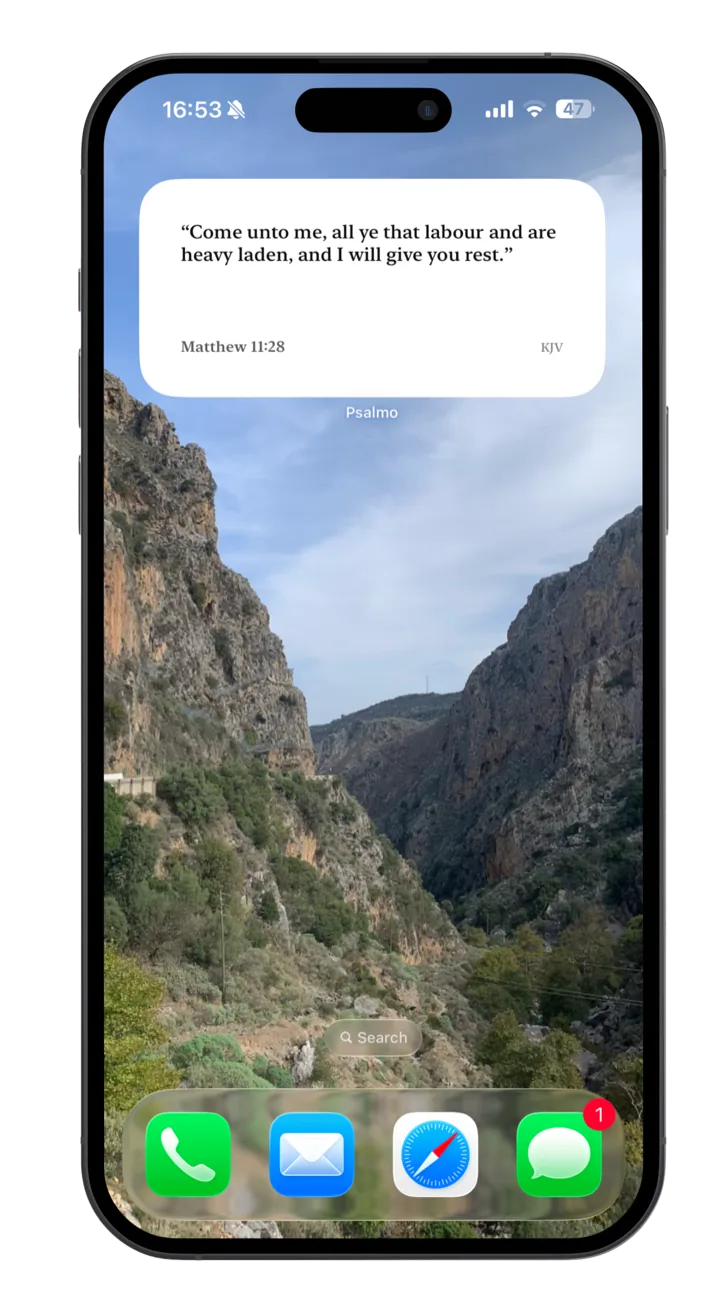
The most beautiful Bible widget on Android.
Three widget sizes, 15+ aesthetic themes, daily verse rotation, and an optional lock-apps gate — built natively for Pixel, Samsung One UI, OnePlus, Xiaomi, and every other modern Android. Free.


Cross-platform: same account, same widget, same scripture across iPhone and Android.
Why Psalmo on Android
Android Bible widgets have always been the afterthought.
Almost every popular Bible widget app is iOS-first. YouVersion ships one bare-bones widget on Android. HRD’s Bible Widgets gets the basics done but never feels like a designed product. Bible Mode and FaithLock aren’t on Android at all — they’re both “coming soon” notes that have been coming soon for over a year.
We built Psalmo for Android from day one. Three widget sizes that actually fit Material You. Fifteen aesthetic themes, not one. The lock-apps feature on Android uses UsageStats + Accessibility — same power as iOS’s Family Controls, just under a different name. And everything works offline because the verses ship with the app.
You won’t see your widget asking for a Pro upgrade to do its job. The home-screen widget, daily verse, and lock-apps gate are free forever on Android, same as iOS.
Install Psalmo on your Android phone.
Free on Google Play. Takes 30 seconds to add the widget.
Setup on Pixel / stock Android
Three taps to a scripture home screen.
Long-press an empty area of your home screen
A menu appears at the bottom. Tap “Widgets” (the second option).
Scroll to Psalmo in the widget list
Widgets are alphabetical. Psalmo offers three sizes: 2×2, 4×2, and 4×4.
Drag the size you want onto a home-screen spot
Resize by long-pressing and dragging the handles. Tap the widget to open Psalmo and pick a theme.
Setup on Samsung One UI
Galaxy-specific bonuses: Edge Panel and Cover Screen.
Pinch-out on your home screen (two fingers, spread)
Or long-press an empty area and tap “Widgets”. Samsung One UI shows widgets in a grid.
Search “Psalmo” in the widget search bar
Skips the alphabetical scroll. The Psalmo widgets group includes all three sizes.
Drag to home screen, optionally add to Edge Panel
On Galaxy phones, you can also pull the Edge Panel from the screen side and add Psalmo there for one-swipe access.
Compare honestly
Psalmo vs YouVersion vs HRD vs Bible Gateway on Android.
We make Psalmo, so we’re biased — but here’s the honest spec sheet for the four Bible widget options Android users typically consider. YouVersion is the default and excellent if you primarily want a reader. HRD Bible Widgets does the basics. Bible Gateway is web-only. Psalmo focuses on the widget surface itself.
| Feature | Psalmo | YouVersion | HRD Bible Widgets | Bible Gateway |
|---|---|---|---|---|
| Android widget | ✓ 3 sizes | ✓ 1 size | ✓ 2 sizes | — |
| Aesthetic themes | ✓ 15+ | 1 | ~4 | — |
| Verse-by-category selection | ✓ 15+ categories | — | Limited | — |
| KJV / WEB included | ✓ Public domain | ✓ All | Limited | ✓ Web only |
| Lock-apps-until-read | ✓ | — | — | — |
| Daily verse notification | ✓ Custom time | ✓ | ✓ | — |
| Material You theming | ✓ | Limited | — | — |
| Free tier | ✓ Real | ✓ Real | ✓ Ads | N/A (web) |
Feature availability accurate as of May 2026 on the Android version of each app.
An honest note
Why Android doesn’t have a true lock-screen Bible widget.
If you’ve searched “bible verse lock screen widget android,” you’ve probably noticed every app dances around the question. Here’s the straight answer: Google removed lock-screen app widgets in Android 5.0 (Lollipop, 2014). No app — Psalmo, YouVersion, anyone — can put a real widget on your Android lock screen because the operating system doesn’t allow it.
What modern Android does allow:
- Lock-screen notifications — Psalmo sends your daily verse as a notification, which appears on your lock screen at the time you choose.
- Samsung Always-On Display — On Galaxy phones, you can pin an AOD “info” style that mirrors your home-screen Psalmo widget.
- Verse wallpaper — Generate a verse image in Psalmo and set it as your lock-screen wallpaper for a static scripture display.
We mention this honestly because every other Android Bible widget guide dodges it. On iOS, the Bible verse lock screen widget works and Psalmo supports it fully. On Android, they don’t, so Psalmo puts its weight into the home-screen surface and the notification system instead.
Frequently asked
Android-specific questions.
Why doesn’t Android have lock-screen Bible widgets?
Google removed lock-screen app widgets in Android 5.0 (Lollipop, 2014). It’s a platform-wide decision, not something any individual app can change. On modern Android, you can still see scripture from the lock screen via three workarounds: Psalmo’s daily-verse notification appears on the lock screen by default, Samsung’s Always-On Display can show your home-screen widget, and Android’s wallpaper can be set to a verse image. We cover all three approaches in the app.
Does Psalmo work on Samsung Galaxy / OneUI?
Yes — Samsung One UI is fully supported, including the Edge Panel and Galaxy Z Fold cover-screen widget surface. Setup on Samsung is identical to stock Android, with the bonus of being able to add Psalmo to your Edge Panel for one-swipe access without leaving your current app.
Does Psalmo work on Xiaomi, OPPO, OnePlus, Vivo?
Yes, all modern Android skins (MIUI, ColorOS, OxygenOS, FuntouchOS) support standard widgets. The setup flow is the long-press → widgets path on every Android phone running Android 8.0 (Oreo) or newer.
How does the daily verse update on Android?
Psalmo uses Android’s WorkManager to schedule a once-daily refresh — typically at midnight in your local time zone. The refresh is battery-efficient because it’s handled by the OS scheduler, not a background polling loop. If your phone has aggressive battery optimization (common on Samsung, Xiaomi, Huawei), allow Psalmo to ignore battery optimization in settings, otherwise the widget may not refresh while the phone is dozing.
Is the widget free on Android?
Yes. The home-screen widget, daily verse, three free themes (Classic, Dark, Minimal), and the lock-apps feature are all free forever. Premium ($) unlocks the remaining 12+ themes, custom photo backgrounds, AI prayer & reflection, and an hourly verse rotation option. There’s a free trial on the annual plan.
Does Psalmo replace the Bible app on my Android phone?
No — and that’s intentional. Psalmo is a widget-first app, not a Bible reader. If you want to read full chapters and books, keep YouVersion or another reader installed alongside. Psalmo lives on your home screen and lock screen, where the Word can be present without needing you to open another app.
Scripture, on your Android home screen.
Install Psalmo and add the widget in under a minute.