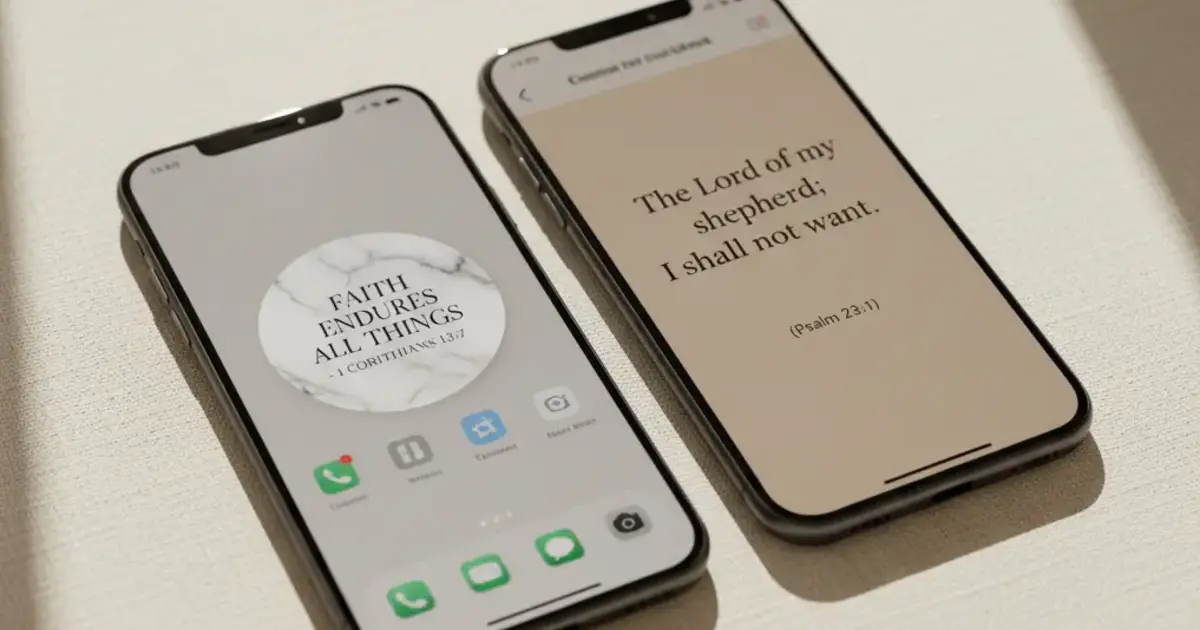

Want a verse on every screen? Psalmo is free.
Two apps come up again and again when people search for a way to put scripture between themselves and the scroll: Psalmo and Bible Mode by Friday Labs. Both block distracting apps until you’ve engaged with scripture. Both are free to start. But they’re built on different assumptions about how that engagement should work, and picking the wrong one will feel like friction you didn’t sign up for. This breakdown covers what each app actually does, where each one wins, and how to choose.
Psalmo and Bible Mode both gate distracting apps behind scripture, but they take different approaches. Bible Mode replaces a blocked app with a full reading session every time you open it. Psalmo gates chosen apps once daily: read today’s verse and they unlock until midnight. Bible Mode is iOS-only; Psalmo runs on iOS and Android and includes a home-screen widget.
Here’s how they compare across features, platforms, and use cases.
What Psalmo and Bible Mode Actually Do
In 2026, two apps lead the scripture-gating category: Psalmo and Bible Mode by Friday Labs. They solve the same core problem (reducing mindless scrolling by routing you through scripture before you reach Instagram or TikTok) but the mechanics differ in ways that matter. Bible Mode works as a full-screen takeover. Open a blocked app and Bible Mode intercepts the launch, replaces the screen with a Bible passage or chapter, and opens the app only after you’ve read it. This happens every time you try to open any app on your blocked list, creating repeated reading sessions throughout the day. Psalmo takes a once-daily approach instead. Read today’s verse in the app or through a home-screen widget, and all your gated apps (Instagram, TikTok, X, YouTube, Snapchat) unlock until midnight. The defining platform difference: Bible Mode is iOS-only, while Psalmo supports both iOS and Android. Psalmo also displays that verse on your home screen as a customizable widget all day; Bible Mode doesn’t include any widget.
For a broader look at apps in this category, the apps that lock Instagram until you read the Bible comparison covers both tools alongside three others.
Psalmo vs Bible Mode: Feature Comparison
| Feature | Psalmo | Bible Mode |
|---|---|---|
| Platform | iOS + Android | iOS only |
| Blocking mechanism | Once-daily gate (unlocks at midnight) | Re-gates every app launch |
| Home-screen widgets | Yes (small, medium, large) | No |
| Lock-screen widgets | iOS 16+ only | No |
| Scripture content | Daily verse (KJV or WEB) | Full chapter reading |
| Theme options | 15+ design themes | None |
| AI prayer tools | Yes (premium) | No |
| Translations | KJV, WEB | Multiple options |
| Free core features | Yes | Limited |
The biggest practical difference is how often the gate appears. Bible Mode creates a reading moment every time you reach for a blocked app. Psalmo creates one moment per day, then keeps the verse visible on your screen for the rest of the day instead.
Where Psalmo Wins
Android support. Bible Mode is iOS-only. If you or anyone you’re setting this up for uses an Android phone, Psalmo is the only scripture-gating option in this category that runs on Android. On Pixel and Samsung One UI devices, it uses the Digital Wellbeing API to create the same daily gate as iOS. This is the clearest differentiator between the two apps for any household that isn’t all-iPhone.
Widgets that carry the verse forward. The verse you read in the morning doesn’t disappear after it unlocks your apps. It stays on your home screen all day in a theme you’ve chosen from more than 15 options: Marble, Stained Glass, Watercolor, Ocean, Pastel, and others. On iOS 16 or later, it can also sit on your lock screen in rectangular, circular, or inline shapes. For users who want scripture woven into their day, the persistent widget creates a different kind of reminder than a one-time gate.
Free tier depth. Psalmo’s core app-blocking and daily verse widget are both free. Premium adds the full theme library and AI prayer tools: generating a prayer for something you’re carrying, finding a verse for a specific situation, or explaining a passage in plain language. Most of what you need is accessible without paying.
Verse sharing. Psalmo generates a themed image of the day’s verse you can send via messages or post to social through the system share sheet. The card matches whatever theme you have active. Bible Mode doesn’t include a sharing feature.
Daily verse notification. Psalmo sends a daily verse notification at a time you set. The same verse appears in the notification, on the home-screen widget, and as the gate on blocked apps, so scripture shows up in one consistent form across your whole phone rather than as separate, disconnected touchpoints.
Where Bible Mode Wins
Depth of daily reading. Bible Mode requires a chapter or a set passage before your app opens, not a single verse. If your goal is meaningful time in scripture every time you’re tempted to scroll, that friction is the feature. A 10-second verse and a five-minute chapter reading create different habits over a month.
Repeated gating throughout the day. Because Bible Mode re-gates every time you open a blocked app, it creates scripture contact multiple times per day. If you open Instagram six times, you get six reading prompts. Psalmo’s once-daily approach creates one touchpoint and then gets out of the way.
Translation flexibility. Psalmo uses KJV and WEB, both public domain. If your daily reading is in NIV or ESV, Bible Mode’s broader translation support is a real advantage.
Bible Mode is the stronger pick if your goal is deep, repeated Bible reading wired directly into your heaviest app habits.
How Psalmo’s Lock-Apps Feature Works
On iPhone, Psalmo uses Apple’s Screen Time API. You pick which apps to gate: any combination of Instagram, TikTok, X, YouTube, and Snapchat. When you try to open a gated app before reading today’s verse, a prompt appears. Open Psalmo, read the verse, and every app on your list unlocks until midnight.
On Android (Pixel and Samsung One UI), Psalmo uses the Digital Wellbeing API to create the same gate. The behavior matches iOS: read once, unlock until midnight.
You can disable blocking at any time in settings. The feature works best as a daily choice rather than a permanent lock.
The verse that gates your apps is the same verse on your home-screen widget. One piece of content in two places: a barrier in the morning, a reminder for the rest of the day.
How Psalmo Displays Scripture All Day
Once you’ve read today’s verse, Psalmo shifts from gate to display. The small widget shows the verse and reference. Add the medium size and you get background texture from your chosen theme. The large widget fills more screen space with the full verse and theme artwork.
On iOS 16 or later, the lock-screen widget gives you 3 shapes: rectangular, circular, and inline. The verse refreshes at midnight by default. You can change the refresh interval to hourly in settings if you want new content throughout the day.
Every theme ships with a matching color palette, font, and background. Classic, Dark, and Minimal are available on the free tier. Marble, Stained Glass, Watercolor, Rose Gold, and the rest unlock with premium.
For a fuller comparison of screen-time apps designed around faith, the best Bible app to reduce screen time roundup covers Psalmo alongside four other options with a comparison table.
Frequently Asked Questions
Is Psalmo or Bible Mode better for Android?
Psalmo is the only option for Android. Bible Mode is iOS-only. Psalmo uses the Digital Wellbeing API on Android to gate Instagram, TikTok, X, YouTube, and Snapchat until today’s verse is read, then unlocks everything until midnight.
Does Psalmo or Bible Mode create more daily scripture contact?
Bible Mode creates more contact because it re-gates every time you open a blocked app. Psalmo gates once per day, then keeps scripture visible through home-screen and lock-screen widgets. Which matters more depends on whether you want repeated reading sessions or persistent visual presence throughout the day.
Can I use Psalmo and Bible Mode at the same time?
Most users pick one. The apps can technically coexist on iOS, but overlapping gates may conflict. Choose based on whether you want once-daily gating (Psalmo) or per-launch gating (Bible Mode).
Does Psalmo support NIV or ESV?
Psalmo uses KJV and WEB, both public domain. It doesn’t support NIV, ESV, NLT, or other licensed translations. If your reading is primarily in ESV or NIV, Bible Mode has more translation flexibility.
How does Psalmo decide which apps to block?
You choose. Psalmo lets you select any combination of Instagram, TikTok, X, YouTube, and Snapchat. Open settings, toggle the apps you want to gate, and those are the apps that prompt a verse before opening.
If you use Android, or you want scripture on your home screen throughout the day rather than just at the moment you try to open Instagram, Psalmo covers both the daily gate and the persistent widget in one free download.




