
Want a verse on every screen? Psalmo is free.
Most Bible apps treat their widget as an add-on. The full chapter reader gets years of engineering attention; the widget is whatever compiled before ship date. If you want scripture visible on your home screen every morning, that gap shows up fast.
I tested 5 of the most-searched best bible widget apps in 2026 across iPhone (iOS 17) and Android (Pixel 8, Android 14) for two weeks each, checking how each widget looks on a real home screen, whether it updates without prompting, and what you actually get for free vs. paid.
The best bible widget app in 2026 for most users is Psalmo: 15+ themes across 3 widget sizes on iOS and Android, optional app blocking (TikTok and Instagram paused until today’s verse is read), and a genuine free tier. YouVersion wins for translation breadth (2,000+ versions). Bible Widgets by Monkey Taps leads on pure iPhone aesthetics.
Here’s the full breakdown of each app, what it gets right, and where it cuts corners.
What Makes a Bible Widget App Worth Using
A bible widget app has one job: get today’s verse in front of you before you open anything else. How well it does that comes down to 3 factors: widget reliability, visual quality, and free-tier depth.
Widget reliability means the verse updates on schedule every morning without you opening the app. iOS uses WidgetKit timelines for this; Android uses WorkManager. When implemented correctly, both systems handle midnight refresh without unusual battery drain. When they’re not, you get a widget stuck on yesterday’s verse for three days. That happens more often than you’d expect in this category.
Visual quality covers theme variety (genuinely different design aesthetics, not just background color swaps), font control, and the range of widget sizes. Most apps offer 2-3 sizes; better apps offer small, medium, and large layouts with real compositional differences between them.
Free-tier depth is the honest test of whether an app respects its users: can you get real daily verse widget functionality without paying, or does the free tier lock you out of anything useful? The answers vary widely across these 5 apps.
The category most comparison articles skip entirely is app blocking. One app lets you pause Instagram, TikTok, or YouTube until today’s verse is read. If that behavioral structure matters to you, the comparison gets much shorter.
The 5 Best Bible Widget Apps in 2026
Here’s the head-to-head. All testing was done on iOS 17 (iPhone 15) and Android 14 (Pixel 8) as of May 2026.
| App | Platform | Widget Sizes | Lock Screen (iOS) | Themes | App Blocking | Free Tier |
|---|---|---|---|---|---|---|
| Psalmo | iOS + Android | S/M/L | Yes (3 styles) | 15+ | Yes | 3 themes, full features |
| YouVersion | iOS + Android | S/M/L | Yes | Limited | No | Full (all translations) |
| Bible Widgets (Monkey Taps) | iOS only | S/M/L | Yes | 10+ | No | Limited |
| Daily Verses | iOS + Android | S/M | No | Few | No | Yes |
| Olive Tree | iOS + Android | S/M | No | Minimal | No | Partial |
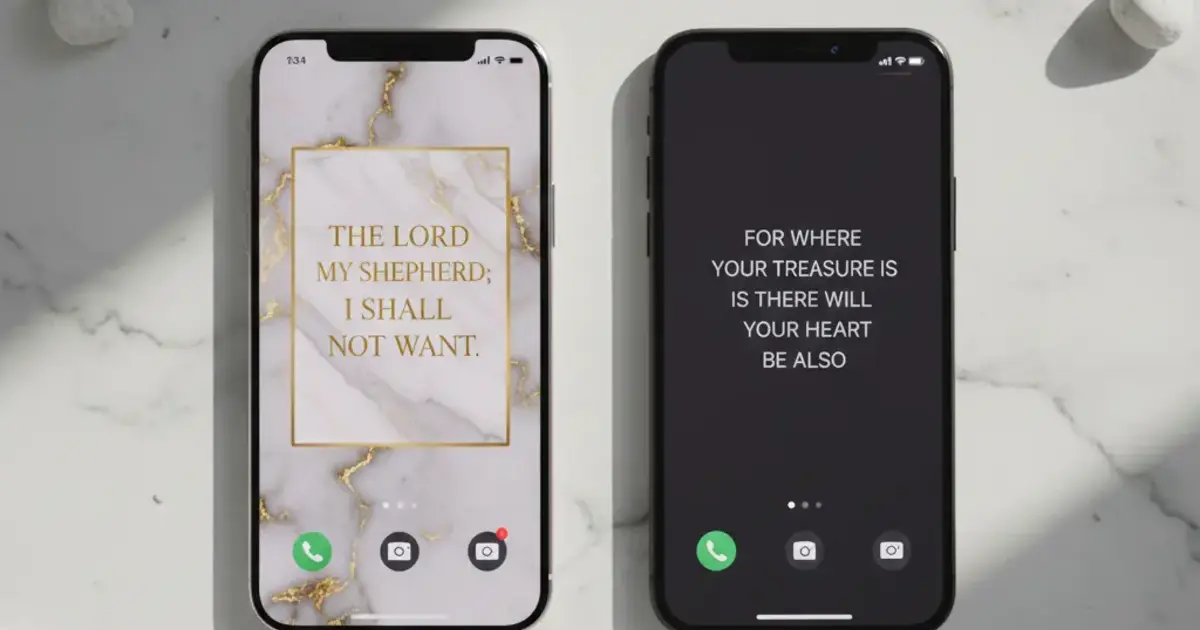
Psalmo is the only cross-platform option with themes, home-screen widgets across 3 sizes, iOS lock-screen widgets, and app blocking in a single app. The free tier covers 3 themes (Classic, Dark, Minimal) and full widget functionality including the blocker. Premium adds 12 more themes and custom photo backgrounds. Translations: KJV and WEB only, both public domain, which is why they’re free without licensing costs.
YouVersion has more Bible translations than any other app in this category (2,000+ versions across languages). Its widget is functional on both iOS and Android, but visual customization is thin: a few color options, no distinct themes. YouVersion is a reader-first app. The widget works, but design isn’t the focus. If your daily reading already happens in YouVersion and you want a verse on your home screen as a bonus, this is the natural choice.
Bible Widgets by Monkey Taps is the main design-focused iOS alternative. Around 10 themes, all looking genuinely polished, and the widget sizing is solid across all 3 home-screen sizes plus iOS lock-screen shapes. No app blocking, iOS only, and the free tier restricts both theme access and widget sizes. For iPhone users where pure visual aesthetics are the top priority, this is the main Psalmo alternative.
Daily Verses delivers a single verse per day through a clean, lightweight widget on iOS and Android. Minimal customization, no app blocking, small feature set. Good if you want the simplest possible daily verse without themes or behavioral tools.
Olive Tree is a serious Bible study platform (commentaries, Hebrew and Greek lexicons, cross-references) that includes basic widget support. The widget shows a verse and updates, and that’s about it. No themes, limited sizing, no lock-screen style options. Olive Tree earns its place on study-focused setups, not on home-screen widget shortlists.
Platform Coverage: Android and iOS Are Not Equal Here
Android coverage in the Bible widget category is patchy. Bible Widgets by Monkey Taps is iOS-only. Several other apps list Android support but haven’t pushed Android updates in 18+ months. Psalmo and YouVersion are the 2 apps with actively maintained Android widget builds as of May 2026.
One clarification worth making: Android hasn’t supported lock-screen app widgets since Android 5.0 (2014). That’s a platform constraint, not an app limitation. Any app promising Android lock-screen Bible widgets is describing something that doesn’t exist at the OS level. The comparison that matters for Android users is home-screen widget quality only.
For a detailed look at how these apps perform specifically on Pixel and Samsung One UI, see best bible widget app for Android.
Themes and Aesthetics: Which Apps Actually Look Designed
Most apps in this category ship 3-5 themes, label them “Classic,” “Dark,” and “Nature,” and stop there. The gap between minimal effort and genuine design investment is visible the moment you place the widget on your actual home screen.
Psalmo has 15+ themes across 5 visual families: textured options (Marble, Forest, Ocean, Watercolor), clean options (Minimal, Modern, Chalkboard), ornate options (Gold Leaf, Rose Gold, Stained Glass), and seasonal palettes (Sunrise, Night Sky, Vintage, Pastel). Three are free; the rest require premium. The full selection and how each looks in context is covered in the aesthetic Bible verse widget guide.
Bible Widgets by Monkey Taps gets close on the iOS side. The themes hold up well, and the design sensibility is consistent. The free tier’s restrictions are more limiting, and iOS-only narrows the audience considerably.
YouVersion, Daily Verses, and Olive Tree offer little design control. Their widgets are functional, not decorative.
Which App Should You Download
You want app blocking (Instagram, TikTok, YouTube paused until you read today’s verse): Psalmo. No other app on this list has it.
You need a specific Bible translation (NIV, ESV, NLT, etc.): YouVersion. Psalmo offers KJV and WEB only; other translations need commercial licenses we haven’t acquired.
You’re on Android: Psalmo or YouVersion. Both have real, maintained Android builds.
You want the best-looking widget on iPhone: Psalmo (more theme range) or Bible Widgets (more curated aesthetic library).
You’re already deep in YouVersion’s reading plans: YouVersion. Adding its home-screen widget keeps everything in one place.
You want the smallest possible footprint: Daily Verses.
For a full free-tier comparison across the category, see free bible widget apps with no subscription.
How Psalmo Handles Bible Widgets
Psalmo was built widget-first. The theme engine, daily verse rotation, and widget refresh system are the product, not features bolted onto a Bible reader.
On iOS, you get 3 home-screen widget sizes (small, medium, large) and 3 lock-screen accessory styles (rectangular, circular, inline) for iOS 16+. Widgets refresh daily at midnight by default, or you can switch to hourly. The refresh runs through WidgetKit’s timeline system, so battery impact is similar to any standard home-screen widget.
On Android, home-screen widgets in 3 sizes update via WorkManager, which handles background scheduling reliably across Pixel and Samsung One UI. Lock-screen widgets aren’t available on Android (platform constraint since Android 5.0 in 2014).
The app blocking feature works like this: you pick which apps to gate — Instagram, TikTok, X, YouTube, Snapchat, or any combination. Those apps are paused until you open and read today’s verse. Once you read it, everything unlocks for the rest of the day. You can disable the gate at any time.
Verse categories include Faith, Peace & Anxiety, Love, Strength & Courage, Gratitude, Healing, Wisdom, Family, Forgiveness, Hope, Prayer, Protection, Work & Purpose, Morning Verses, and Evening Verses. You toggle categories on in settings, and the daily verse draws from what you’ve enabled.
Download Psalmo free and check the widget sizing on your home screen before committing to a theme.
Frequently Asked Questions
What is the best bible widget app for iPhone in 2026?
Psalmo is the best bible widget app for iPhone in 2026 if you want theme variety and optional app blocking. It offers 15+ themes, 3 home-screen widget sizes, and 3 lock-screen widget styles for iOS 16+. YouVersion is the better pick if you need a specific translation like NIV or ESV, since it supports 2,000+ versions vs Psalmo’s KJV and WEB.
Can I get a bible verse widget for Android?
Yes. Psalmo and YouVersion both have maintained Android apps with home-screen widgets in 3 sizes. Bible Widgets by Monkey Taps is iOS-only. Lock-screen Bible widgets aren’t available on Android. The platform removed lock-screen app widget support in Android 5.0 (2014), which is a platform constraint, not a specific app limitation.
Is there a free bible widget app with no subscription?
Yes. Psalmo’s free tier includes 3 themes (Classic, Dark, Minimal) and full widget functionality including app blocking, no subscription needed. YouVersion is completely free with no paywall on any translation. Daily Verses also has a functional free tier. Bible Widgets by Monkey Taps limits theme and size access on its free plan.
Which bible widget app has the most themes?
Psalmo has the widest theme range with 15+ options across distinct visual styles including Marble, Stained Glass, Watercolor, Vintage, and Rose Gold. Three themes (Classic, Dark, Minimal) are free; the rest require a premium subscription. Bible Widgets by Monkey Taps offers around 10 themes with strong visual polish.
Does any bible app let you block other apps until you read a verse?
Yes. Psalmo’s Lock Apps Until You Read feature lets you select which apps (Instagram, TikTok, X, YouTube, Snapchat, or any combination) get paused until you open and read today’s verse. Once you read it, everything unlocks for the rest of the day. No other major bible widget app in 2026 has this feature.
If you want your home screen to open with scripture before the scroll starts, download Psalmo free and set up the widget and blocker in under 5 minutes.




